What is Lolibrary?
Lolibrary is a database that is dedicated to documenting lolita fashion and history! You’ll find information on items from lolita brands in Lolibrary, like clothing and accessories; you can also find entries on publications, such as KERA and Fruits. Lolibrary was created in 2010 by amethystcitrine, along with many other contributors. Over the past 14 years (at the time of writing this), over 90,000 entries have been created!
Lolibrary’s mission is to document street fashion and to preserve the lolita fashion subculture.
In addition, Lolibrary is entirely run by volunteers! If you’d like to support Lolibrary, you can contribute to their Patreon or make a donation. Lolibrary is truly a labor of love from the developers and contributors, and it’s a testament to the power of community. When lolitas from around the world come together, we can truly create something amazing!
What can you use Lolibrary for?
Lolibrary can be used for so many things!
- Finding and identifying specific items (are you being haunted by an unknown dress from Angelic Pretty? Me too, to be honest)
- Finding items that match certain criteria (I have to fuel my obsession with celestial navy dresses somehow, okay?)
- Creating and adding entries into Lolibrary (yes, you can do it too! You, the person reading this!)
- Creating a wishlist
- Creating a virtual closet
This guide will mainly focus on teaching you how to search for items on Lolibrary. It is intended for people who are completely new to Lolibrary or people who have little experience with using it. However, I encourage you to explore and experiment with Lolibrary! The best way to learn something is by doing it.
Anyone can use Lolibrary to search for items and view entries, whether you have an account or not. However, you must have an account if you’d like to create entries for Lolibrary, create a wishlist, or create a virtual closet. You must also have an account if you want to submit additional images/info or corrections for Lolibrary entries.
Disclaimer: I am not an expert on Lolibrary! I am very passionate about it, and I have contributed nearly 300 entries at the time of writing this guide. But I am nowhere close to being an expert, and I welcome the input of others as well!
The Anatomy of a Lolibrary Entry
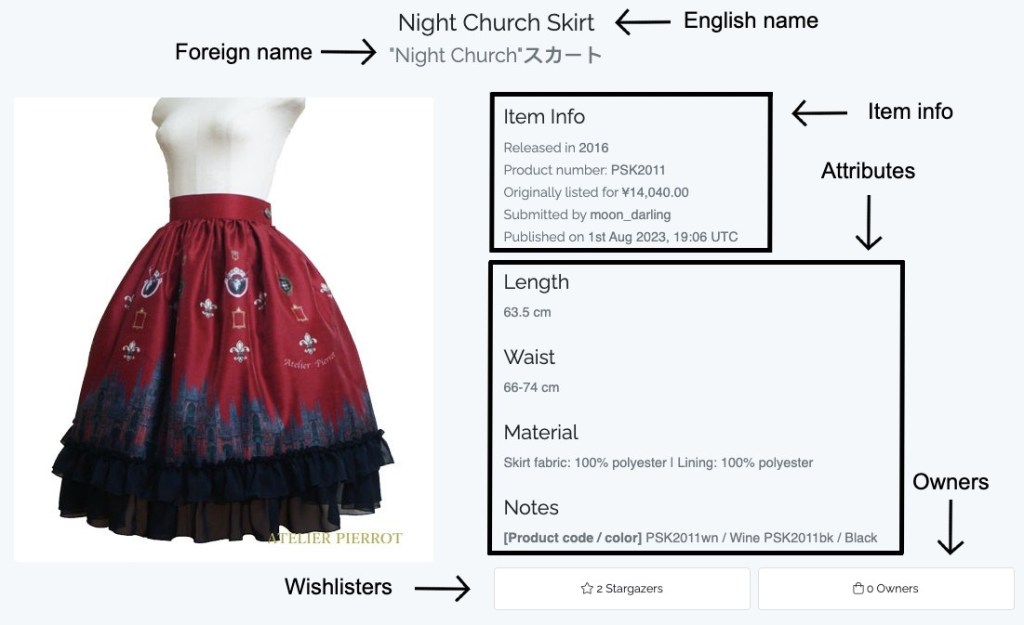
What does a typical Lolibrary entry look like? Let’s begin!

- English name: this is the English name of the item. Sometimes, brands will provide their own English translations for items if their native language isn’t English. However, many Lolibrary contributors will use machine translators (such as Google Translate) to come up with an English translation for the item names. There are some Lolibrary contributors who will write a human translation if they can understand the brand’s native language and English.
- Foreign name: this is the original name of the item. If the original name of the item was in English, this field may be blank.
- Item info
- Release year: this is the year that the item was released. On rare occasions, this field may be blank.
- Product number: this is the item/product number of the product. Sometimes, this field is blank.
- Original price: this is the original price of the item when it was first available for purchase. There are many different currencies available in Lolibrary (Japanese yen, Chinese yuan, Korean won, US dollars, British pounds, etc.) Sometimes, this field is blank if the price was unknown when the entry was created.
- For many releases from Japanese brands, the original price will have tax included within the price.
- Author: this is the username of the person who created the Lolibrary entry (in this case, moon_darling is me).
- Publishing date/time: this is the date and time that the entry was published on Lolibrary.
- Attributes: these are used to capture garment and item measurements. For more detailed information, please visit the Lolibrary Wiki page. Depending on what information is available, there may be many attributes or very few attributes on an entry.
- Wishlisters: this box indicates how many Lolibrary users have added this item to their wishlist.
- Owners: this box indicates how many Lolibrary users have added this item to their closet. This does not reflect the actual number of total owners worldwide.

- Category: this is the type of item.
- An entry can occasionally have multiple categories. For example, if the entry is for a lucky pack, and the lucky pack contains a JSK and blouse, then the listed categories could be “JSK”, “blouse”, and “sets”
- Brand: this is the brand that released the item. Each item can only have one brand listed.
- However, if the item was a collaboration with another brand, the Lolibrary contributor will choose the main brand that produced and released the item for sale.
- Features: this refers to structural features of the item. Entries will try to list features that are officially confirmed by the brand or by owners.
- Colorways: this refers to the colorways that the item was available in.
- Tags: the tags mainly refer to motifs or details that are seen in prints. However, there are also tags for fabrics, garment details, collaborations, sub-brands, etc.

- These are images of the item. Usually, these will be images from official brand sources or websites. However, some entries have images from owners if there are no official brand images.
Searching for Items on Lolibrary
First, go to the search bar. If you’re on a computer or laptop, the search bar will be at the top of the website. If you’re on your phone, click the box with three lines at the top of the website. Then, click “Search”.

Filters
There should be a sidebar with multiple filters. Currently, the available filters are categories, brands, features, colors, tags, and year. You can use these filters to help you find the item(s) that you’re looking for! The Lolibrary Wiki has pages with comprehensive definitions of each filter and criteria, but here is a brief overview.
- Categories: this is the type of item (ex. JSK, blouse, jewelry, etc.)
- Brands: this is the brand that released the item. Not every brand will have their own designation in Lolibrary. Brands will qualify for their own designation once they reach a certain amount of items in Lolibrary (around 200 items).
- If you’re looking for items from a Chinese indie brand that doesn’t have its own designation, try searching with “Chinese Indie Brand”
- If you’re looking for items from all other indie brands that don’t have their own designations, try searching with “Indie Brand”
- Tip: some indie brands have their own tag if they have a certain amount of items in Lolibrary! Try searching for “Indie Brand: [insert name]” in the tags filter.
- Tip: if an indie brand doesn’t have their own tag, you can also try searching for the brand’s name in the search bar! The entries for many indie brands are titled with the brand’s name and item name.
- Features: this refers to structural features of the item. For example, a back zipper is a structural feature of a dress, but stars on a dress are not a structural feature.
- Lolibrary’s definitions of features may be different from how brands and other lolitas define features. For example, some brands may use the term “full shirring” to indicate a shirring panel that covers the entire back of a bodice. However, Lolibrary would define this feature as “back shirring”. Please refer to the Lolibrary Wiki page on features for more information.
- Tip: you may be able to find certain properties relating to item construction in the tags filter! Try searching for “Detail: [insert name]” or “Fabric: [insert name]” or “Material: [insert name]” in the tags filter.
- Colors: this is the colorway of the item. The colorway is typically the main color of an item.
- Lolibrary contributors will mainly use the official colorways that are given by a brand. However, this may not always match what you think an item’s color is. In addition, if a brand doesn’t list an official colorway, Lolibrary contributors will try their best to find the best color match.
- There are many colorways that have two colors (ex. black x white, pink x lavender, etc.) However, it is usually more effective to use the colorways with one color in your search (ex. using pink or lavender instead of pink x lavender).
- Tip: if you’re unsure of what color an item is, try using multiple colors in the colors filter! For example, if an item looks white, try using white, offwhite, cream, ivory, etc. and set the inclusion/exclusion setting to “Any”.
- This filter can’t be used for finding items with a combination of colors within the item. For example, let’s say you’re searching for a singular dress with four colors in the print (black, white, yellow, and red). You can’t search for black, white, yellow, and red in the colors filter and set the inclusion/exclusion setting to “All”. More on inclusion/exclusion settings later…
(This is the Japanese Fan Print Tuck JSK from Metamorphose Temps de Fille, and this item is tagged with the “black” color in Lolibrary.
- Tags: this is the filter with the most criteria in it. Usually, this filter is used for motifs or items in prints (patterns, stars, angels, animals, roses, etc.). However, as I previously mentioned, you can also find tags for indie brands and garment/item details. The tags are usually self-explanatory, but there are some tags that may not be obvious. Please refer to the Lolibrary Wiki page on tags for more information.
- Year: this is the year that the item was released. You can use the slider to search for items within a range of years by adjusting both ends of the slider. To search for items within one year, make sure that both ends of the slider are on the same year.

Multiple filters can be used at once. For example, if you’re searching for a red JSK from Angelic Pretty that has dogs, you can use the categories, brands, colors, and tags filters:

In addition, you can search for multiple criteria within each filter. For example, here is me searching for an Innocent World JSK with strawberries, cherries, or fruit in general.

For each filter, you have three inclusion/exclusion settings:
- Any: for multiple criteria, this means that Lolibrary will find items that have any of the criteria you’re searching for. This can be useful for a broad search or if you’re not sure about what you’re looking for. Ex: strawberries OR cherries OR fruits.
- All: for multiple criteria, this means that Lolibrary will find items that have all of the criteria you’re looking for. This can be useful for a very specific search. Ex. strawberries AND cherries AND fruits.
- None: for one criterium or multiple criteria, this means that Lolibrary will find items that have none of the criteria you’re looking for. This can be useful for excluding items you’re not looking for. Ex. NO strawberries and NO cherries and NO fruits.
Search Bar
The search bar is at the top of the website, and you can search for items by name. Typically, item names are written in English. When you type an item’s name or search term into the search bar, Lolibrary will search through English names, foreign names, and product/item numbers of all entries. Then, it will display entries that contain your exact search term in any of those fields (English name, foreign name, or item number). This means that if you’re looking for the famous Pup in a Cup OP, you will not find it in Lolibrary if you type “Pup in a Cup”. However, if you type out the full name (or any part of the full name), you will find it. So yes, you do not have to type out “The World’s Most Adorable Dog and The World’s Most Delicious Frappe Print OP”.


Another example is item names with accent marks. If you are looking for the regular Cirque du L’Étoile JSK, and you type Cirque du L’Etoile without the accent mark, you will not find it. The usage of accent marks is inconsistent, however, and this can depend on the brand and Lolibrary contributor.

(This is the special set, not the regular JSK that we were looking for)

(The first JSK is the regular JSK that we were looking for)
Some entries in Lolibrary have the brand name in the English name (ex. [brand name] ~ [item name]). This is used when the brand doesn’t have their own brand designation, mainly indie brands (Chinese, Korean, western, etc.). If you’re searching for items from a certain indie brand, you can try entering the brand name into the search bar. For example, here is me searching for items from the Chinese indie brand Hoshibako Works.

Another tip – I mentioned earlier that Lolibrary will search through product/item numbers of all entries. That means that if you have a product/item number for an item, you can try entering that directly into the search bar! Not all entries have product/item numbers in the entry, but it can be a helpful tip.

Limitations
As you can see, Lolibrary can be a powerful tool. However, like all tools, it also comes with limitations. The biggest limitation is that Lolibrary is incomplete. Not every release from every lolita brand is captured in Lolibrary, even from large brands. In addition, it can be difficult to document past releases, especially if website links haven’t been preserved or if the links are hard to find. With older releases, there may not be any online links at all. And even when there are saved links, there may be missing information and pictures.
In addition, sometimes brands do not provide a lot of information about their releases. Some brands may provide many details about their items, multiple sets of measurements, and several photos of their items from different angles. Other brands may only provide a few measurements and photos. Therefore, there may not be much official information on a Lolibrary entry.
Another limitation of Lolibrary is that there may be mistakes in the entries. For example, items may not have the features or tags that you think they should have. There may be incorrect measurements or items may be named incorrectly. There are several reasons for this, but at the end of the day, Lolibrary contributors are human and mistakes are uncommon. However, if you see a mistake on an entry, you can submit corrections if you have a Lolibrary account.
Sometimes, when you own an item, the item’s measurements may not match what is written in Lolibrary. Or, the color of the item may look different in person versus in the stock photos. This does not mean that the Lolibrary entry for that item has mistakes. Lolibrary contributors are usually taking information from what the brand has written officially, and there may be discrepancies due to the ways that brands measure items or photograph items. If you own an item, you can submit owner information to a Lolibrary entry if you have a Lolibrary account.
Disclaimers
Not everything in Lolibrary is considered lolita, and that’s okay! As I mentioned before, Lolibrary is dedicated to documenting lolita history, in addition to the fashion itself. This means that there are entries on items such as postcards, magazines, stationery, etc. from lolita brands. This also means that there are entries from brands that have made an impact on lolita history at one point, but the brands may not make items intended for lolita fashion anymore (ex. Jane Marple, Vivienne Westwood, 6%DOKIDOKI).
Another note is that Lolibrary is constantly being updated and improved by its developers, so some features may change over time. For example, the years filter used to be similar to the other filters (in that you selected individual years instead of a time range on a slider). Another development is that there are translations for Lolibrary in other languages! These translations are currently a work in progress, but you can find the available languages at the top of the website. If this guide becomes vastly outdated at some point, I’ll try to update it.
I hope that this guide was helpful! This is just a starting place for learning how to use Lolibrary, and there are so many more tips and tricks out there. I hope that you’ll love Lolibrary just as much as I do, and I hope you find your dream pieces!


 Tea Rose Garden
Leave a comment