
Special Thanks to Rhino for adding search terms!
Last Updated 2-23-2024
Xianyu (闲鱼) can be an amazing place to find secondhand deals for lolita, but it can be daunting and difficult to use. This guide is an attempt to hopefully make things easier for English speakers looking to get into buying from Xianyu. It is focused on Lolita fashion, but can be used as a guide for buying general products as well.
For those who don’t know, Xianyu is a secondhand selling platform connected to Taobao, similar to Mercari and Vinted, where individual sellers put up their own listings for sale. If you are not physically located in China, you NEED a shopping service to buy from Xianyu. Shopping services will be briefly discussed in the guide, but I recommend you get familiar with using them first before trying to buy from Xianyu.
What makes Xianyu difficult to buy from is not only the fact that everything is in Chinese, but also the fact that there is a very specific Xianyu culture and etiquette, especially surrounding secondhand lolita sales, that you are expected to follow while buying from the platform. This will also be discussed later in the guide.
One VERY important thing to note about Xianyu is that buying secondhand from an independent seller is always a risk, and doubly so on Xianyu. Neither Xianyu as a platform nor your shopping service can or will do much if you get scammed or buy a replica on accident. There is no buyer’s protection when you are an overseas customer.
Without further ado, let’s get going!
Table of Contents
- Table of Contents
- Making a Taobao Account
- Logging in
- Anatomy of a Xianyu Listing
- Searching for Lolita on Xianyu
- Using Shopping Services
- Xianyu Culture and Etiquette
- Avoiding Scams
Making a Taobao Account
To access Xianyu, you first need a Taobao account. Go here to learn about making one: https://www.howtotao.com/taobao-account/
Once you have your Taobao account, it’s time to log into Xianyu.
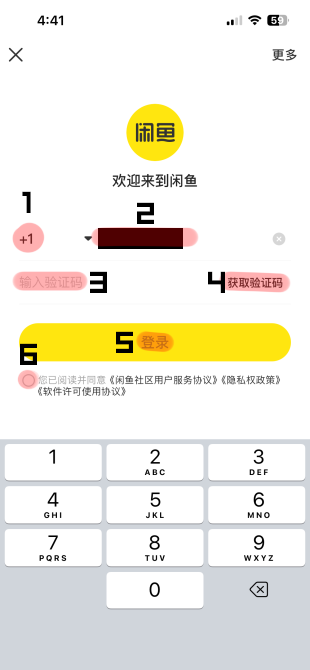
Logging in
1. Select the area code of your phone number. This will pull up a separate screen with a list of countries that have the area code listed to the right.
2. Input your phone number here. I’ve blocked mine out for obvious privacy reasons.
3. This is where you enter the verification number that is sent to you via text message once you press the button labeled 4.
4. Press this after inputting your phone number to retrieve a verification code.
5. Login button. Once you press this, a little popup will come up asking if you agree to Xianyu’s terms and services. Press the yellow button labeled ‘同意’ (Agree) to continue.
6. Don’t forget to tap this little circle to indicate you agree to Xianyu’s terms and services.
Now we’re on Xianyu’s homepage. It can be overwhelming to look at at first, but all you need to know to use it properly is the following:
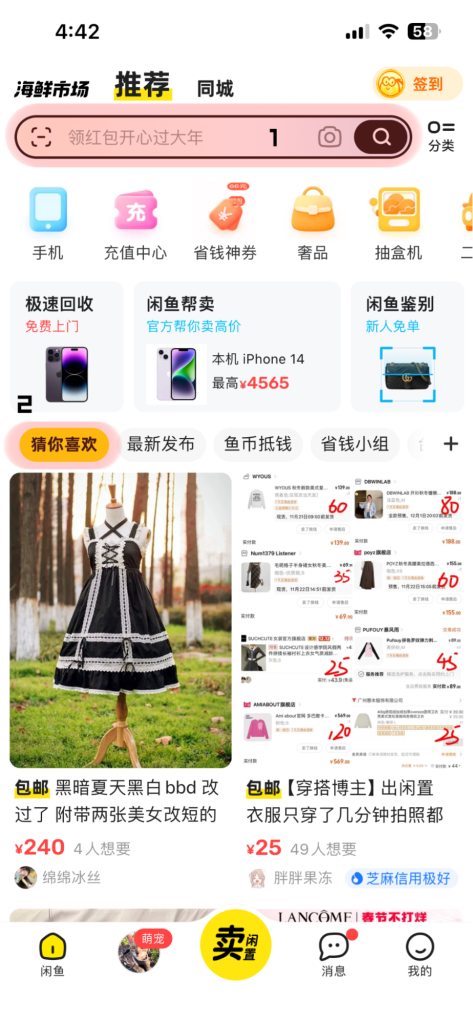
1. The search bar. Use this to search for whatever goods you’re looking for. I’ll be going over a list of search terms you can use later in this guide, as well as common terminology used on Xianyu.
2. Recommended listings. Everything below the highlighted section on the homepage is a recommended listing based on your previous search history on Xianyu. I’ve looked at a lot of babydoll dresses recently, so Xianyu gives me a lot of those.
Now, let’s tap on this first listing to see what it looks like.
Anatomy of a Xianyu Listing
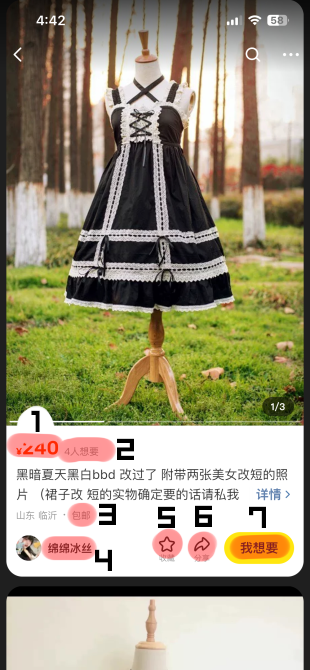
For some reason, the new Xianyu update makes it so that it gives you a preview of a listing when you tap on it once (only if you tap stuff from your home page recommendations, not if you search a listing). You can scroll down to view other recommended listings, but if you just want to look at the first listing, just tap the description.
1. Price in yuan
2. Number of people who have liked the item
3. 包邮, meaning ‘Shipping Included’
4. Seller name
5. Favorite button. Press this to add this to your list of favorites.
6. Share button. Press this to grab a link to the item.
7. 我想要, meaning ‘I want this item’. You’re not going to press this if you’re an overseas user, since you’ll be using a shopping service to get the listing you want.
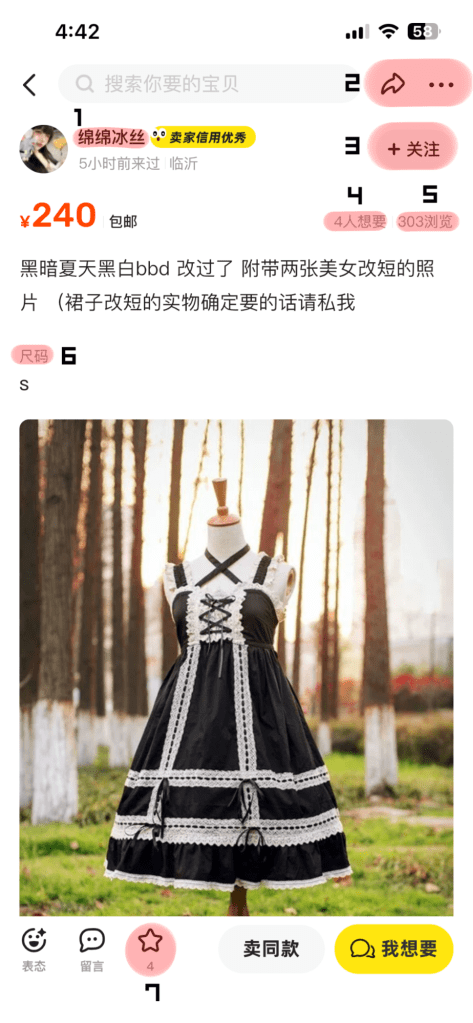
1. Seller Name. Tap this to get to the seller profile.
2. Share Button. Tap this to get the link of the listing.
3. The ‘Watch Seller’ button.
4. The number of people who have favorited this item.
5. The number of people who have seen this listing.
6. Size.
7. The favorite button.
Grabbing Links
Grabbing links (if you can) is a pretty simple and straightforward process. Just Tap the Share button highlighted in the above image (Number 2) and it will lead you to this popup.

Tap the ‘Get Link’ Button in 1.
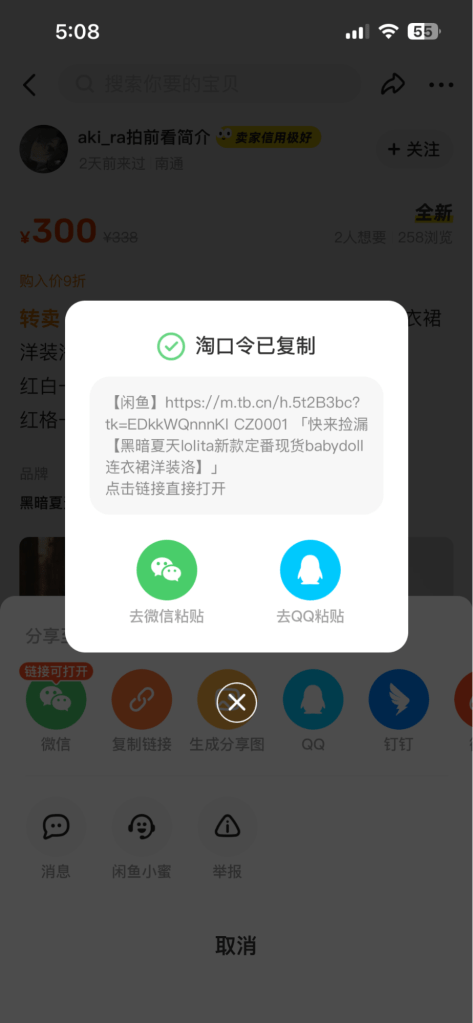
Don’t worry about this message, it just tells you that your link has been copied. You can safely press the X button to close this popup.
Searching for Lolita on Xianyu
Generally, you’re able to search for lolita dresses by brand name and dress name on Xianyu. This isn’t a perfect method, since many dresses don’t use English keywords, but you’re more likely to get some hits than not.
Xianyu also has an image search option in the search bar, if you’d prefer to search brand releases by picture instead. This can be VERY useful and is highly recommended for searching through Xianyu.
If you find something similar to the specific dress you’re looking for, try opening the listing and scrolling down through the recommended listings. If you keep on opening recommended listings and scrolling down for more recommendations, you’re more likely to be able to find the dress you want. I call this method ‘nesting’ lmfao.
If you’re not looking for a specific dress on Xianyu and just want to browse, try combining some of the search terms below together. For example, you can type in ‘日牌lo裙’ (Japanese brand lolita dress) to find listings that have those keywords.
More terms can be found on Petrovna’s Taobao Dictionary
Search Terms
lo裙 – lolita dress
lolita
洛丽塔 – lolita
国牌 – chinese brand
日牌 – japanese brand
Jsk
Sk
Op
兔熊 – Usakumya
切替 – Cutsew
中古 – Used/Vintage/Old (sometimes used to describe secondhand items, sometimes used to describe vintage-like classical items, sometimes used to describe chinese dynasty style items. use context clues to distinguish what context it’s used in)
码/尺码 – size
小物 – small items like accessories, novelty goods, etc
发带/有发带 – waist ties/has waist ties
Brand Terms
Angelic Pretty – Ap
Baby the Stars Shine Bright – Baby
Alice and the Pirates – AnP
Atelier Pierrot – AtP
Juliette et Justine – JeJ
Atelier Boz – Boz
Moi-meme-Moitie – MMM
Maxicimam – mam
Sheglit – 老谢
Bodyline – bl
Aurora & Ariel – AA
Elpress L – El
Ecailles de Lune – Kinyo (name of the owner)
Krad Lanrete – kl
DearCeline – DC
Frequently Used Terms
出/急出 – selling/emergency selling
收/同收 – want to buy/also want to buy
换 – want to trade
拍/直拍/不直拍 – buy/direct buy/don’t direct buy
山/清山/山品 – replica/replica/replica product
正/正品 – genuine/genuine product
可刀/可大刀/不可刀 – can haggle/can haggle heavily/can’t haggle
包邮 – shipping included
新/全新/几乎新 – new/all new/like new
Print Terms
樱桃兔 – cherry berry bunny
奶油星球 = milky planet
三色堇 = sweetie violet
安睡玩偶粉 = suya suya toys
嘲讽兔 = marshmallow bunny
泰迪 = British Bear
猫咪情人节 = Be my Valentine
草莓芭菲 and/or 草莓牛奶 = Milky Berry
小鹿日现 = Milky Chan the Fawn
蛋糕马 = decoration dream
Using Shopping Services
My recommended shopping service for buying from Xianyu is Spreenow, but you can use other shopping services if you’d like. I’m only going to go over how to buy from Spreenow in this guide, however.
The process is very simple: you copy the Xianyu link of the listing, then paste it in Spreenow DIY Quick Add and add in listing information. Spreenow has a DIY Quick Add option where you will paste the Xianyu link and fill in the information needed. They also have a tutorial embedded on their website on how to use the Quick Add option, so I won’t be going over that here.
If your account is locked on Xianyu and you can only browse, you can also talk to Spreenow Support in the chat and explain your situation. They will let you take screenshots of the listing you want and paste it in the Support Chat, at which point they’ll manually enter it into your cart. Try not to abuse this feature if you are able to get links yourself, since this is a time and labor-intensive endeavor for Spreenow staff.
Xianyu Culture and Etiquette
Xianyu has a unique culture and set of etiquette rules that you may not know when first using the platform. Here are some unspoken ‘rules’ and customs on the platform:
- Listings will often not have proof photos. This is common, since there is a problem of scammers on the platform stealing proof photos from the listings of legitimate sellers. Having no proof photo is not necessarily a sign of a scam. Likewise, a proof photo is not necessarily a sign that the item is legit.
- Some sellers will wait until you buy the item to send proof photos.
- Some sellers will often only sell you a specific dress if you buy some of their other listings as well. This will be explained in the listing description or the seller’s profile.
- Some sellers prefer you buy a listing immediately without asking questions to the seller. Sometimes, they might block or ban you from buying from them for sending them messages before buying.
- On the other hand, some sellers prefer that you contact them before buying a listing. Ask your shopping service to do this if a listing description indicates this.
To add to that, there are also scammers and replica sellers to watch out for on the platform. If you look carefully at a listing and a seller, however, you can usually tell when something is fishy. Here are some ways you can vet a seller before you take the risk and buy something on Xianyu.
Avoiding Scams
Knowing how to avoid scams and replicas on Xianyu is very important. Here are a couple of tips for avoiding scams on Xianyu.
- Check the description of the listing for IMPORTANT information! Some sellers want you to only buy with other items before they’ll ship, some sellers don’t want you to message them at all, some sellers don’t allow haggling or else they’ll block you. Make sure you know what the listing says.
- Buy from sellers that list things for a reasonable price. You can find great deals on Xianyu, but if an item is way too cheap for its worth, it’s likely a replica or scam. If it sounds too good to be true, it probably is.
- Buy from sellers that look like they’re interested in the community and have had a history of selling/buying other lolita items. Translate their profile to get more information on them.
- Buy from sellers that have sold a decent amount items and have good ratings. Look through their listings to see what they’re putting up for sale.
- Look through listing comments to see what other people are saying about that listing.
- If you’re not sure about the legitimacy of a listing, ask a friend or experienced lolita familiar with Xianyu!
Let’s go through how to check a seller’s ratings with the screenshot below. If you scroll down on an item listing, you’ll get to the seller information this way.
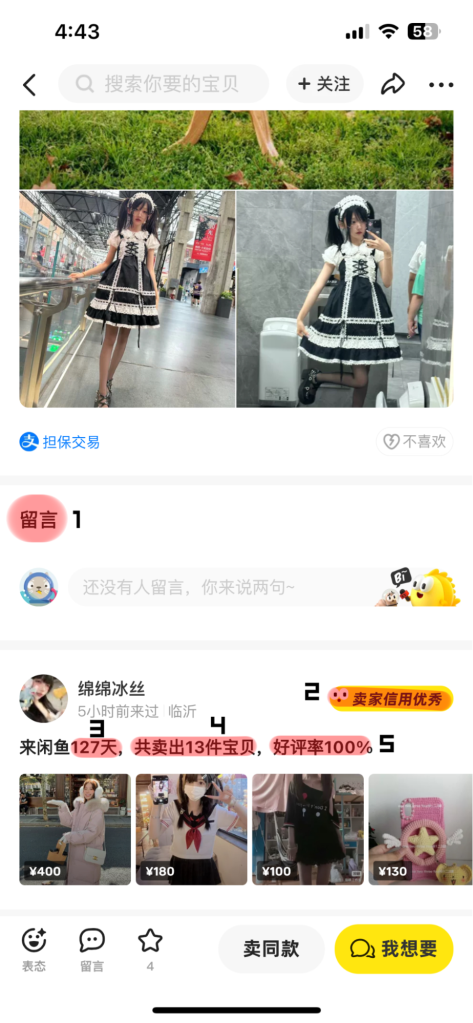
1. Comments on the listing. Translate these to figure out what people are saying about it. Valuable information can be found here.
2. A seller banner that says ‘Distinguished Seller’. Banners like these can say different things at times, so translate them with an image translator to figure out what this seller is being distinguished for.
3. This number refers to how long a person has been on Xianyu.
4. This number refers to how many items a seller has sold.
5. This percentage is the seller rating percent. Try to only buy from sellers with a 95-100% rating.
Now let’s tap the seller’s name to look at the selling profile.
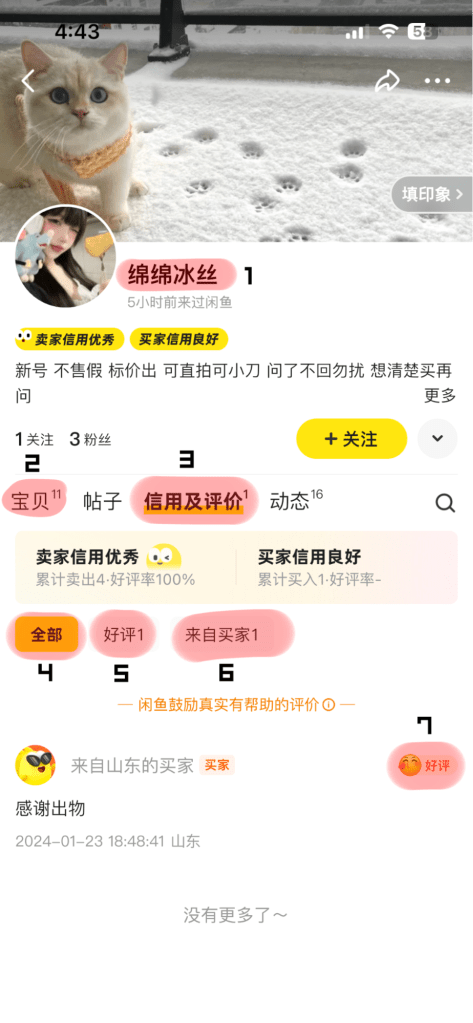
1. Seller Name.
2. The ‘Listings’ Tab. The number refers to how many listings this seller has up. Check this tab to see what other items the seller is selling.
3. The ‘Ratings’ Tab. The number refers to how many ratings this person has.
4. ‘All Ratings’
5. ‘Good Ratings’
6. ‘Ratings from the Buyer’
7. ‘Good Rating’. Ratings marked with ‘好评’ can safely be ignored and untranslated. If a rating IS NOT marked as ‘好评’, make sure to translate the rating, because that means it’s a neutral or negative review.


 Tea Rose Garden
Leave a comment